See what has quietly rolled forward.
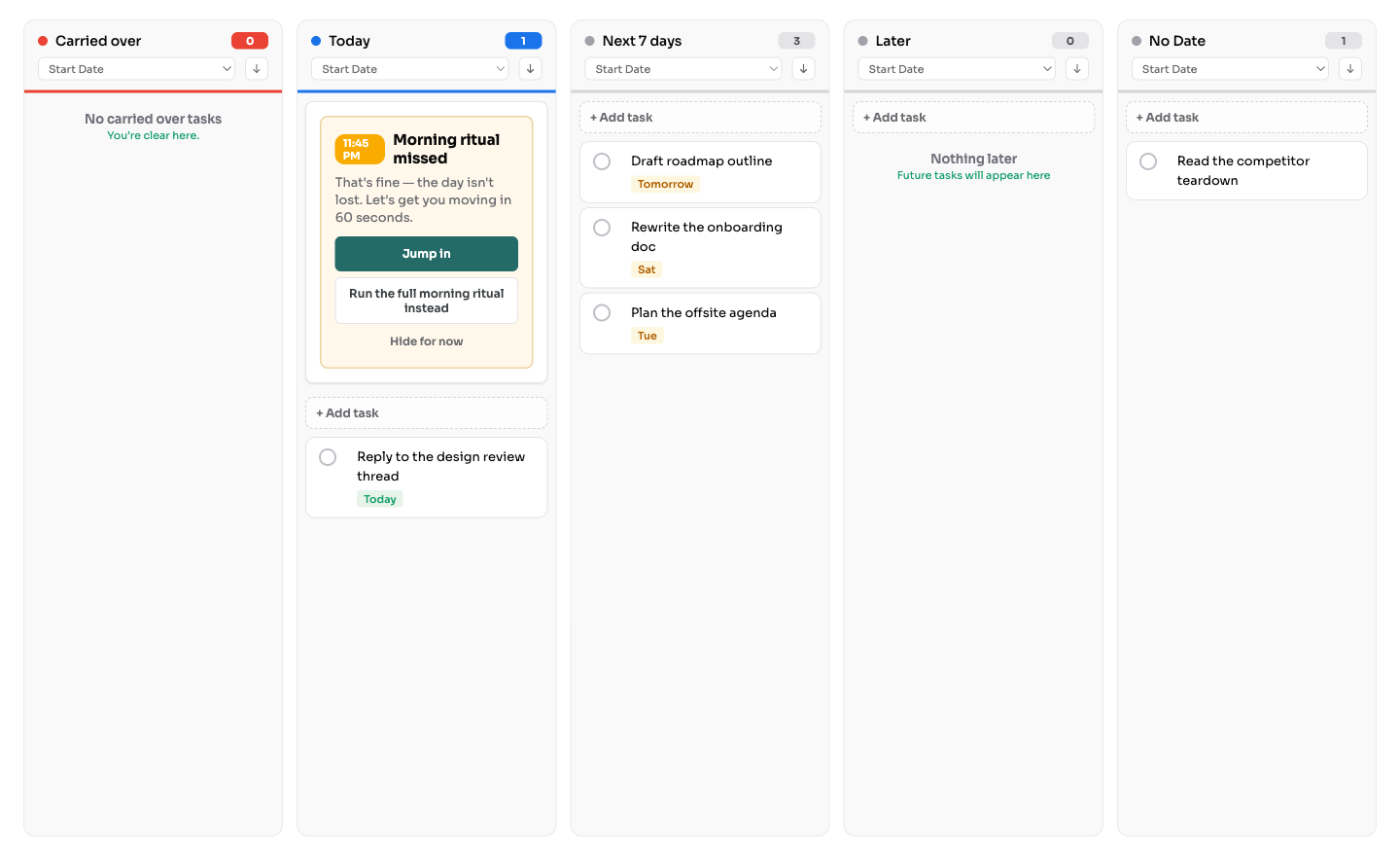
The ritual surfaces the tasks that have been carrying for three days or more—up to ten at a time, oldest first—and shows how long each one has waited. Nothing stays out of sight until you go looking for it.
A more purposeful way to use Google Tasks
Traverce turns Google Tasks into a calm, visual planning space. Set a direction for the day, choose the task where your attention will matter most, and keep it visible while you work.
From the whole picture to today's focus
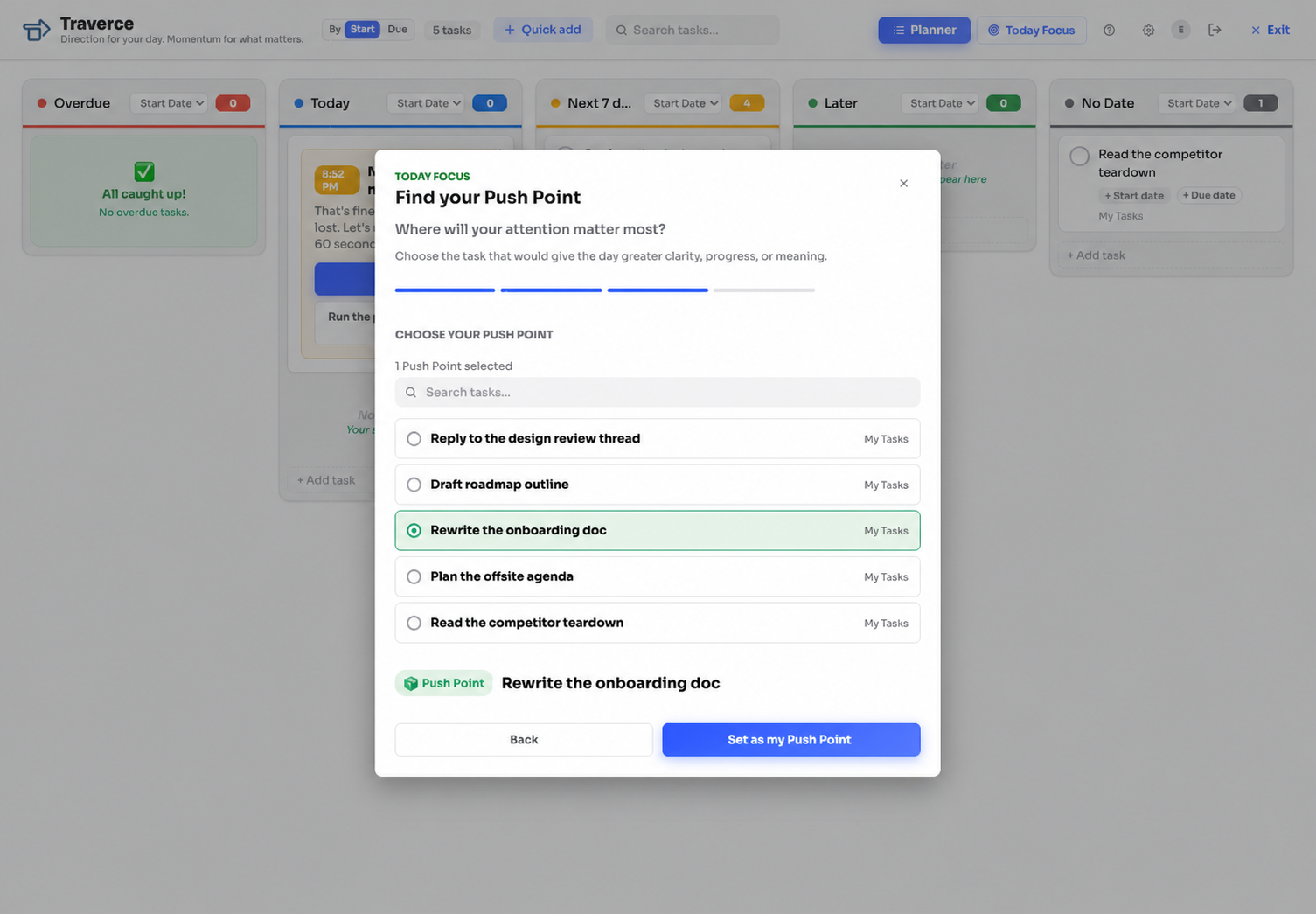
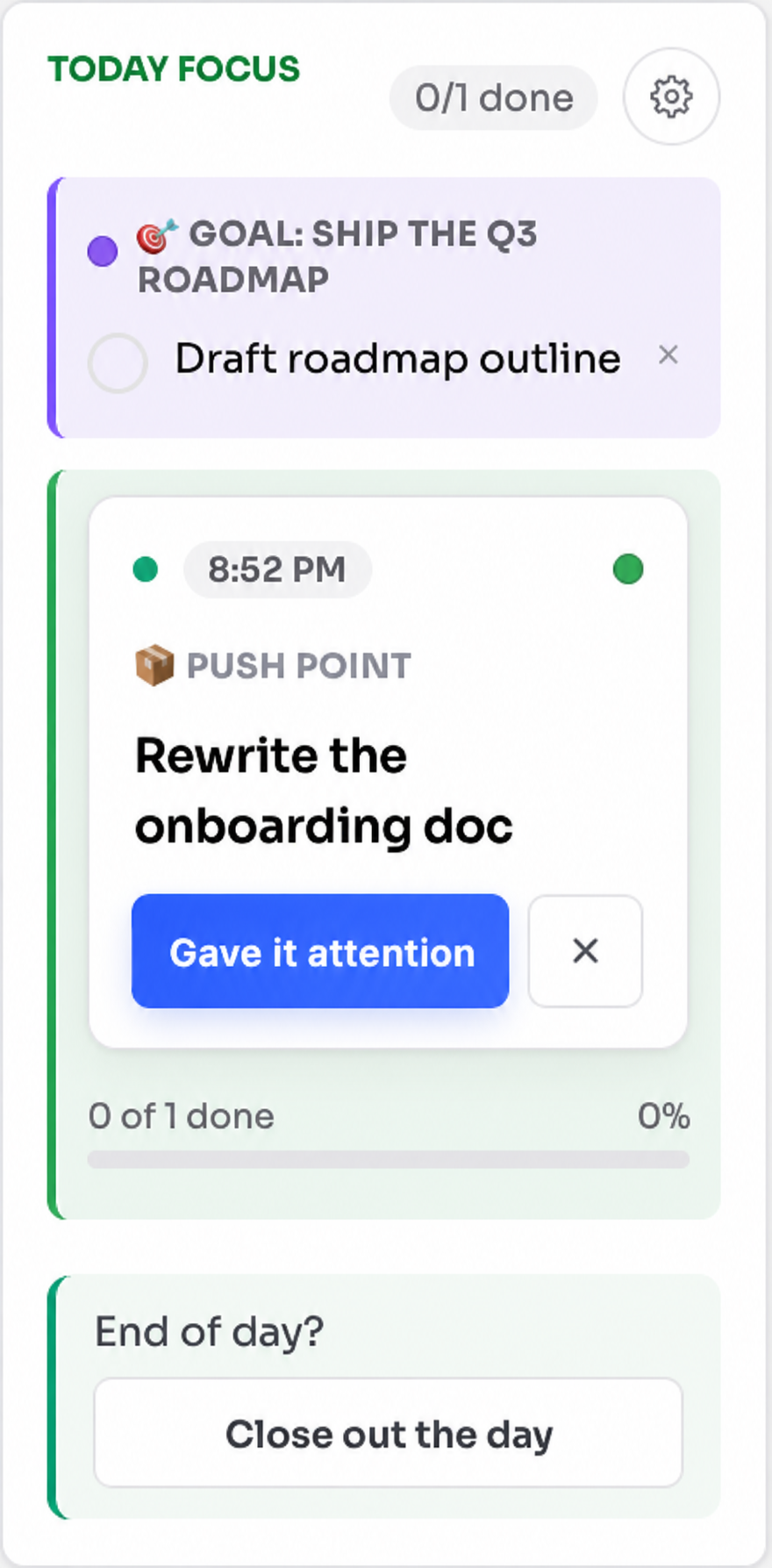
Plan from the full board when you need perspective, then bring Today's Goal, Goal Step, Push Point, and priorities into one calm place while you work.
Visual planning
See your Google Tasks across five clear views — Carried over (or Overdue, when you organize by due date), Today, Next 7 Days, Later, and No Date — and show only the ones you want in front of you. Move tasks as plans change, arrange them in your own order, or sort each column by start date, due date, title, list, or when you created or last touched a task.
Morning Ritual
Pause before the day fills up. Review what matters, choose Today's Goal—the purpose your day is serving—and connect it to one concrete Goal Step. Add the other priorities that should stay visible, then move forward with a considered plan.
Only in the extension
Traverce Capture on iPhone runs the same ritual—clear your head, choose Today's Goal, name a Goal Step, pick your Push Point, and add your other priorities. The extension keeps all of that and adds something the app does not have: it notices the work quietly rolling forward and helps you reconsider it—without judgment, without scores, and always with the final choice left to you.
The ritual surfaces the tasks that have been carrying for three days or more—up to ten at a time, oldest first—and shows how long each one has waited. Nothing stays out of sight until you go looking for it.
Does this actually matter? Then, depending on your answer: is there real pressure to do it now, or is it time to let it go? You land on one decision—make it today's Push Point, defer it to a date you choose, clear the date so it can wait without pressure, or close it out.
When a task has rolled for five days or more, the ritual asks you to decide before moving on. It never decides for you—it simply keeps the question from going unasked another morning.
When a whole week has slipped, move every overdue task at once into Today, the next seven days, Later, or no date at all—then plan again from a list that reflects where things actually stand.
Each goal shows whether it is on track, slowing, or drifting. When one has been still for a while, the ritual asks what is going on: give it a task today, leave it active but deprioritized, pause it for two weeks, or archive it.
When a Push Point cannot receive meaningful attention in a single sitting, break it into up to three concrete steps. They become real subtasks in Google Tasks, and you choose which one belongs to today.
Starting late? The extension offers a shorter path into the day—today's goal and your Push Point in two steps. The core ritual—braindump, Today's Goal, Goal Step, Push Point, and priorities—is free on iPhone too, permanently. See Traverce Capture →
Deliberate attention
Your Push Point can come from anywhere in your task list. It does not have to be the hardest task, the first task, or something you finish in one sitting. It is simply where deliberate attention could bring greater clarity, progress, or meaning.
Meaningful attention is enough.
Today Focus
Clear away the wider board and bring your daily plan forward. Today's Goal, Goal Step, Push Point, and priority tasks stay visible together, giving you a calm place to return to as the day changes.
Quick Add
Add a task from the board or compact browser panel, then check the title, list, start date, and due date before saving. Traverce can recognize phrases such as “starting tomorrow” or “due tomorrow,” while always giving you the final say.
When you choose to save the current webpage, Traverce includes its title and link. It does not collect your browsing history.
Everyday task tools
Edit titles and notes, create and rearrange subtasks, and set repeating schedules without leaving your planning view. Search titles and notes, use hashtags as simple filters, and open useful links directly from the task where they belong.
Full board or compact panel
Open the full board when you want to see the wider picture. Use the compact browser panel when you want today's tasks nearby while working on something else. Your changes stay aligned with Google Tasks across both views.
Day's End and The Week's End
Notice what moved forward, reflect on the attention you gave, and choose what deserves attention next. Focus History helps you recognize patterns such as repeated carry-over without grading your effort or reducing your days to a score.
Insights
A private view of your last 30 days: what you capture and where it comes from, how often your Push Point received the attention you set aside for it, how your Morning Ritual has gone, and what you decided about work that carried over.
It is calculated in your browser and never leaves it—counts and dates only, never task titles, notes, page titles, or addresses. No day is marked missed and nothing is scored. It reports what happened and leaves the conclusions to you.
Privacy and trust
Traverce works with the tasks in your Google account and does not keep a separate online copy of them. Preferences and planning details stay in your browser. There is no advertising, tracking pixel, browsing-history collection, or sale of personal information.
Read the Privacy PolicyFrequently asked questions
For setup help and more detailed answers, visit Traverce Support. To see what changed in recent versions, read the release notes.
Traverce is a Chrome extension that turns Google Tasks into a visual daily planning experience with a Morning Ritual, Push Point, and focused view for today.
No. Traverce works with your existing Google Tasks and adds new ways to view, plan, and work with them.
A Push Point is the task you choose to give deliberate attention today—the place where attention could bring clarity, progress, or meaning.
A Push Point is about meaningful attention, not forced completion. You can continue, make it smaller, choose a new date, move it, or remove it.
Traverce Capture runs the same ritual—braindump, Today's Goal, Goal Step, Push Point, and your other priorities. On iPhone the full ritual is free, permanently—there is no trial. The extension adds a further layer: it surfaces tasks that have been carrying over, walks you through triaging them, checks in on goals that have stopped moving, and helps you break a Push Point into a smaller step.
In the extension, the Morning Ritual surfaces it and asks whether it actually matters—then, depending on your answer, whether there is real pressure now or whether it is time to let it go. You choose one outcome: make it today's Push Point, defer it to a date, clear the date so it waits without pressure, or close it out. Traverce never makes that choice for you.
No. Traverce helps you see your options. You choose your goal, Goal Step, Push Point, priorities, dates, and what happens to unfinished work.
No. Traverce is an independent product and is not made, endorsed, or sponsored by Google.
Traverce for Google Tasks in Chrome
See the work ahead, choose where your attention matters most, and give each day a clearer sense of direction.
Add to ChromeSee what's new →Traverce is an independent product and is not made, endorsed, or sponsored by Google.